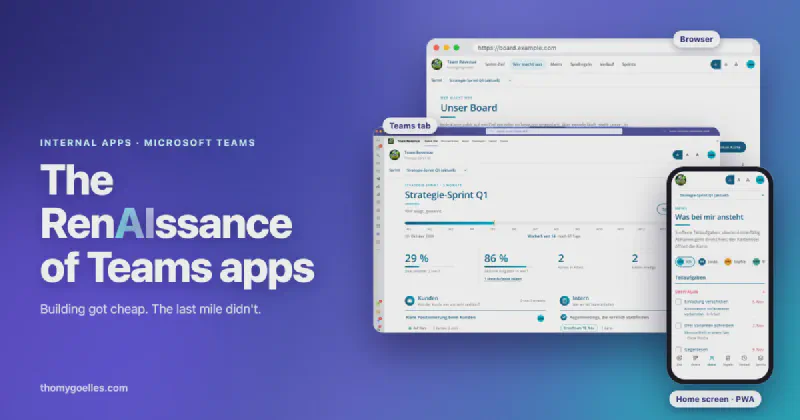
The RenAIssance of Teams apps
This post is also available in German: Die RenAIssance der Teams-Apps
I’ve built a few internal apps with a coding agent lately. One of them does what marketing used to do by hand after every webinar. It finds the new event on the website, matches it to a CRM campaign, pulls the attendance report and the transcript from Teams an hour after the session ends, sorts the attendees into leads and writes conversation starters for the follow-up calls, and it took about a week to build. Another is a shared board for a team of four, with a quarterly goal, a kanban, a change history and sprint metrics, which runs in Teams, in the browser, on the phone and as a command line the team’s agents can read and write, and that one took about ten days.
What I kept running into wasn’t the board. The app registration lives in our dev tenant, and before anyone in the production tenant can sign in, an admin there has to consent to it. To be fair, that admin is me. I hold an app admin role in our production tenant, which makes this step a lot shorter for me than for most people who build something like this. It’s also the kind of privilege you have to treat the Spider-Man way: with great power comes great responsibility, and nobody wants to be the admin who waved through an over-permissioned app because it happened to be their own. So the board asks for delegated User.Read and nothing else, no application permissions, no access to mail or files, and the consent went through my separate admin account the same way it would for anybody else’s app. It got release notes that tell the other admins exactly what they’re approving, and a friendly message for anyone who opens it before an admin has. The real work was everything around the code, where the thing runs and how the four people who should use it even find it.
Building the app stopped being the hard part
For a long time the expensive part of an internal tool was writing it. You needed a developer for a few sprints, and ideally somebody who’d still remember how the thing worked a year later. That’s why so many good ideas died as Excel files with macros, or never left the whiteboard.
That cost has collapsed. With a coding agent, a department lead who can describe a process clearly can end up with a working web app in an afternoon, and a developer can turn out several of them in a week. I don’t think that’s controversial anymore, it’s what’s happening on a lot of laptops right now.
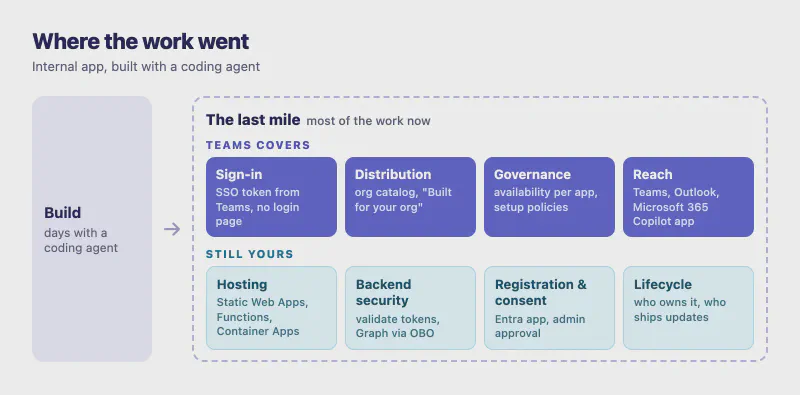
What hasn’t collapsed is everything after npm run dev. The app needs an HTTPS endpoint. It needs to know who the user is without inventing yet another login. It needs a way to reach the 40 or 400 people who should use it and not the ones who shouldn’t. And someone in IT has to be able to see it, approve it, update it and eventually switch it off. That last mile used to be a rounding error compared to the build effort. Now it’s most of the work, and it’s exactly the part a coding agent can’t decide for you, because the answers depend on how your tenant is run.
For internal apps, Teams already built that last mile
Here’s my hot take. I think we’re about to see a renaissance of Teams apps, and I mean the boring internal kind, line-of-business apps that never go near a store listing and get published into one company’s own catalog. SaaS vendors have been building Teams apps for years. What’s changing is who else can build one, and most of the last-mile questions above already have answers in Teams, a platform your organization is paying for and governing anyway.
Getting the app to people is the easy part. The quickest way is to upload it yourself, usually called sideloading. You drop the app package into Teams and it’s there for you or for a team you’re in, with no approval step. Admins decide who’s allowed to do that, and in our tenant it’s another privilege I happen to have. The regular way is to submit the app to your organization, even straight from VS Code. It then waits in the Teams admin center until an admin publishes it, and after that people find it under “Built for your org” in the Teams app store.
Governance is already where your admins work. Since April 2025, tenants have been migrated automatically to app centric management, and the old app permission policies are deprecated. Every app now carries its own availability, either everyone, specific users or groups, or no one. If you pick specific users or groups, guests can’t use the app even if you add them, which for an internal tool is exactly the default you want. On top of that, app setup policies let an admin pin the app to the app bar for the people who need it, so nobody has to go looking.
The login page is the next thing you can delete. With single sign-on for tabs, the user is already signed in to Teams with their Microsoft Entra ID account, and your app asks Teams for a token instead of showing a login page. If the Entra app registration lives in the same tenant as the users, which is the normal case for a line-of-business app, there’s no consent prompt either. The token tells you who’s there (name, email, object ID, tenant ID), and your backend can trust it once it validates it.
And the app shows up in more places than Teams. A personal tab built with a current manifest (1.13 or later) also runs in Outlook and the Microsoft 365 Copilot app, including their mobile apps, from the same package and with the permissions already granted in Teams.
What Teams doesn’t do for you
Teams doesn’t host your code, and that’s the bit most Teams pitches quietly skip. A Teams tab is a web page that Teams loads in a frame, and a bot is a web service that Teams sends messages to. Both still have to run somewhere, and for most of us that somewhere is Azure.
For a typical vibe-coded app, a static frontend with a small API, Azure Static Web Apps is the obvious first stop. The Free plan is labeled “for personal projects”, gives you 250 MB per app and managed Functions for the API, but no SLA and no private endpoints. The Standard plan adds custom authentication registrations, private endpoints, bring-your-own Functions and an SLA, which is what an app your colleagues depend on should run on. I’m not putting a price here, because Azure prices don’t move quite as often as petrol prices but they do move, so check the Static Web Apps pricing page or run your setup through the Azure pricing calculator. Anything heavier, a container with a real backend or a long-running job, goes to Container Apps or Functions, and then you’re back to the usual Azure decisions, starting with whose subscription pays for it.
There’s also a constraint that bites people who host on a default Azure hostname. The Entra application ID URI has to be in the form api://your-domain/your-app-id, and the domain has to match the domain your app is served from. Learn is blunt about it, multiple domains per app aren’t supported, so if you plan to move from the generated hostname to a custom domain later, it pays to do that before you register anything in Entra.
So Teams covers the hard half of the last mile, and hosting, backend security, data access and the lifecycle of your own code stay with you. For an internal app that’s a much smaller problem than building sign-in and an approved app catalog yourself, and one every Azure developer has solved before.
From a vibe-coded web app to a Teams tab
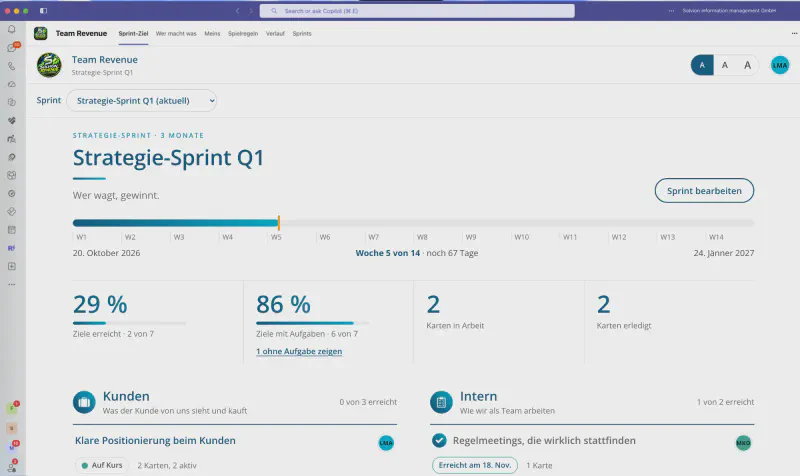
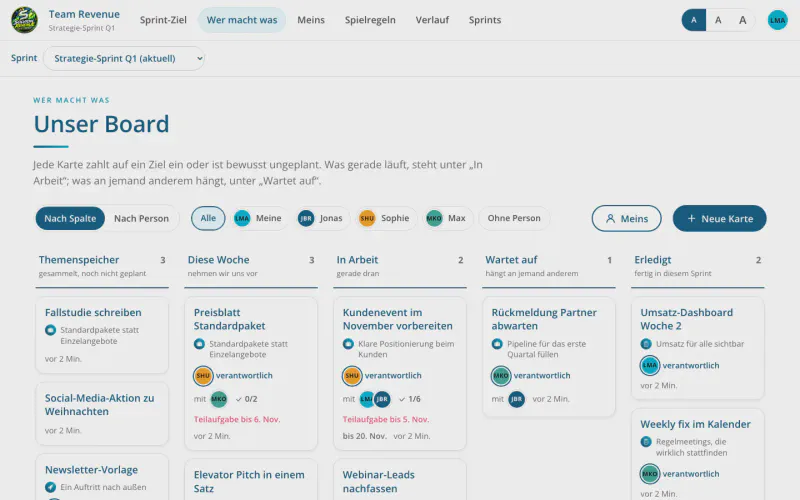
The board from the beginning is a good example, because it’s one code base with three front doors. In Teams it runs as a personal tab, and the Teams tab bar takes over the app’s own navigation.
The same address in a browser shows the full app with its own navigation and a regular Microsoft Entra sign-in.
On a phone it installs to the home screen as a progressive web app and moves the navigation to the bottom.
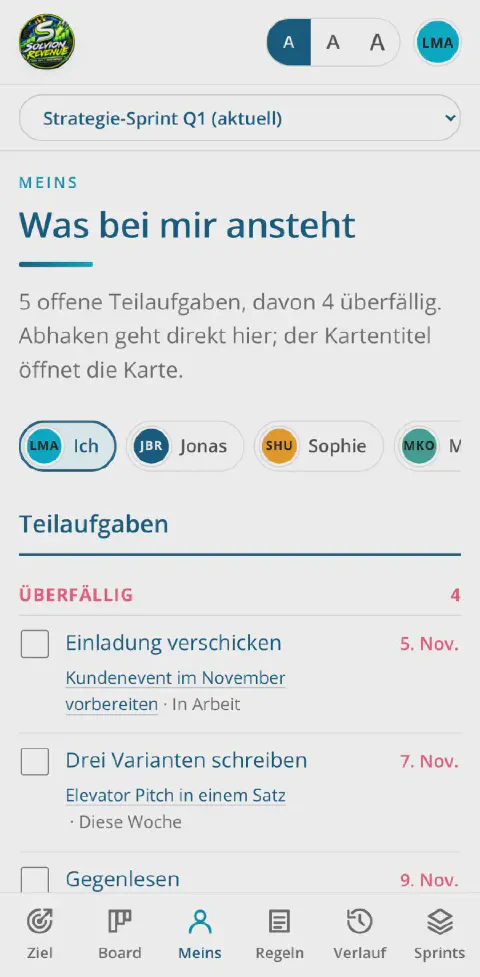
The app finds out where it’s running from a single query parameter, ?host=teams, which the Teams manifest adds to the tab URL. With it, the frontend initializes the Teams library and asks Teams for a token; without it, it signs in through MSAL. The team and everything else on these screenshots is demo data from the app’s local dev mode, since the real board stays inside the company.
The Teams side is mostly configuration, and Learn covers it well. You register the app in Microsoft Entra ID, expose an API scope, pre-authorize the Teams clients so they can get a token without bothering the user, and point webApplicationInfo in the Teams manifest at that registration. In the frontend it’s a single call to getAuthToken(), and the backend validates the token like any other Entra token. Because my registration lives in a different tenant than the users, the admin consent had two traps worth knowing about. As long as the app has no service principal in the users’ tenant, a consent link with a scope fails with AADSTS500011, and if the app lists its own scope under required permissions, consent fails with AADSTS650052.
You don’t have to wire any of this by hand. The Microsoft 365 Agents Toolkit scaffolds the project including the Entra registration, and for new projects Microsoft points to the Teams SDK. Its welcome page suggests installing a teams-dev skill and simply asking your AI coding assistant to “create a Teams bot”, which tells you pretty clearly who Microsoft expects to be building Teams apps from now on.
Shadow IT finally gets a landing strip
Those vibe-coded apps already exist in most companies. They run on someone’s laptop or as an HTML file in a OneDrive folder that gets forwarded around, and banning coding agents mostly makes them invisible. What IT can do instead is offer a landing strip that’s more attractive than the workarounds, and Teams happens to be one that’s already built.
That means a short, written path. Here’s the Azure subscription you deploy into and the Entra setup we expect, submit the app to the catalog and we’ll look at it within a few days. The Teams admin center can even post every new submission into a Teams channel through a notification rule, so the review doesn’t depend on someone checking a portal. In return, IT gets an inventory of what’s actually running, with an availability list per app that can be set to “no one” the day it’s no longer needed.
Before you open the gate, look closely at one line in the submission docs. Once an app has been approved, anyone can submit an update to it, not just the original developer. Every update still has to be approved by an admin, so nothing ships silently, but it does mean the admin center tells you who submitted a version and not who owns the app. Ownership is a question you have to answer in your own process, and I’d answer it on day one.
Where this leaves people who build and people who decide
If you build things, I’d stop treating Teams as the place where you post a link to your app and start treating it as the runtime for anything internal. Single sign-on plus a catalog that your IT already trusts is worth more than whatever you’d build yourself in the same evening, and the Azure part is the part you already know.
If you run IT, the cheapest move right now is to publish the path before the first department publishes its own. Decide which subscription internal apps go into, who reviews submissions, what “owner” means and when an app gets switched off. The tools for all of that are in the Teams admin center today, and what’s usually missing is the decision to use them for apps IT didn’t build itself.
Both apps I described here were done in days, and the part I had to write release notes for was the sign-in. That’s the ratio I’d plan for.
Enjoyed this post? Let's continue on LinkedIn.
Follow on LinkedIn